Showing posts with label Messages. Show all posts
Ed F8

Delete all messages at once on Facebook

Want to clear up your Facebook inbox? Here is the guide for deleting all Facebook messages at once. We'll discuss the best tweak through which you can implement to easily delete all your Facebook inbox messages instantly with just a single click.

See: How to change phone number to email on Facebook
Delete all messages at once on Facebook


You might at one point wish to clean your entire inbox on Facebook but can't do it all at once. What if I told you a simple chrome extension can  help you fix this?

Here, we'll let you know how to clear all inbox junk at once. We are going to be using a chrome-app called “Message Cleaner“. This simple tool allows clearing of all your Facebook messages by one click without having to delete one after another, It even allows to Select and Deletes multiple messages at once.

Now you need to install the above extension in your Chrome browser. Once you have successfully completed the download and installation process, Then you have to just login into your facebook account in which you need to clear up all the junk inbox.
Once you complete the login process all you have to do is, Just click on messages and need to tap on “see all in messenger“.

Now here just tap on the Message Cleaner extension which is available at the top right corner of the browser. Just tap on it and click on “Delete All Messages“. As you can see the messages getting deleted with a few seconds.

Now repeat this process until you complete deleting your inbox.
Read More
Ed F8

How Do I Delete Messages Or A Conversation?


Learn How Do I Delete Messages Or A Conversation: Deleting messages on Facebook Messenger is easy but certainly not as easy as deleting your email. Facebook hopes to keep your conversation and Facebook Chat intact. In order to delete messages on Facebook, you'll need to:
  • Open the individual message.
  • Go to options and start selecting the message you wish to delete. 
  • If you have many messages, the process can take a lot of time. Luckily, you can simply remove the messages from the message list, but doing this will not remove the message permanently. Instead it will be archived, and will reappear when the person starts a fresh conversion via Facebook messenger..

Smart Reads:


First, you have to login Facebook


Next, click here and go to Facebook messages:


Then, type people name who you want delete messages in Search Box:

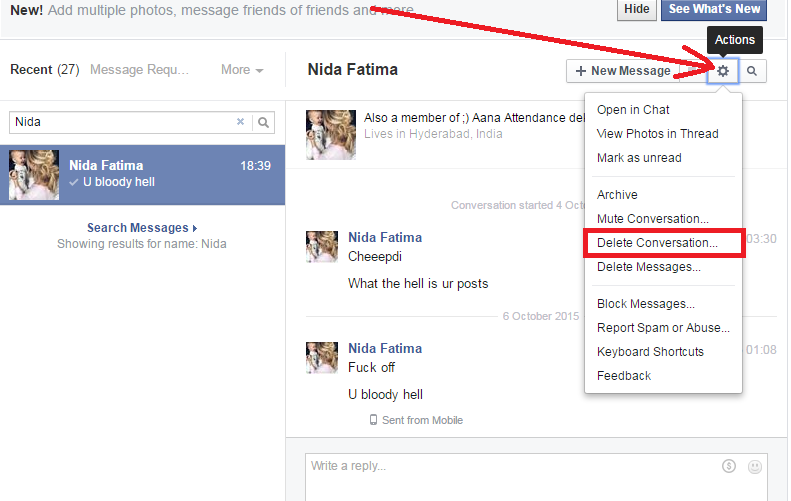
I delete messages with Nida :
Next, click Actions ~> Delete Messages:
Now, tick messages you want delete:
After that, click Delete:

Finally, click Delete messages:
Done. If you want delete conversation, click Actions ~> Delete Conversation:
And, click Delete conversation:


Be sure you really want to permanently delete your Facebook messages because it can't be undone.
Read More
Ed F8

How to Delete all messages at once on Facebook

How to Delete all messages at once on Facebook: Want to clear up your Facebook inbox? Here is the guide for deleting all Facebook messages at once. We'll discuss the best tweak through which you can implement to easily delete all your Facebook inbox messages instantly with just a single click.

See: How to change phone number to email on Facebook


You might at one point wish to clean your entire inbox on Facebook but can't do it all at once. What if I told you a simple chrome extension can  help you fix this?


How to Delete all messages at once on Facebook


Here, we'll let you know how to clear all inbox junk at once. We are going to be using a chrome-app called “Message Cleaner“. This simple tool allows clearing of all your Facebook messages by one click without having to delete one after another, It even allows to Select and Deletes multiple messages at once.

Now you need to install the above extension in your Chrome browser. Once you have successfully completed the download and installation process, Then you have to just login into your facebook account in which you need to clear up all the junk inbox.
Once you complete the login process all you have to do is, Just click on messages and need to tap on “see all in messenger“.

Now here just tap on the Message Cleaner extension which is available at the top right corner of the browser. Just tap on it and click on “Delete All Messages“. As you can see the messages getting deleted with a few seconds.

Now repeat this process until you complete deleting your inbox.
Read More
Ed F8

Delete all messages at once on Facebook

Want to clear up your Facebook inbox? Here is the guide for deleting all Facebook messages at once. We'll discuss the best tweak through which you can implement to easily delete all your Facebook inbox messages instantly with just a single click.

See: How to change phone number to email on Facebook

Delete all messages at once on Facebook


You might at one point wish to clean your entire inbox on Facebook but can't do it all at once. What if I told you a simple chrome extension can  help you fix this?

Here, we'll let you know how to clear all inbox junk at once. We are going to be using a chrome-app called “Message Cleaner“. This simple tool allows clearing of all your Facebook messages by one click without having to delete one after another, It even allows to Select and Deletes multiple messages at once.

Now you need to install the above extension in your Chrome browser. Once you have successfully completed the download and installation process, Then you have to just login into your facebook account in which you need to clear up all the junk inbox.
Once you complete the login process all you have to do is, Just click on messages and need to tap on “see all in messenger“.

Now here just tap on the Message Cleaner extension which is available at the top right corner of the browser. Just tap on it and click on “Delete All Messages“. As you can see the messages getting deleted with a few seconds.

Now repeat this process until you complete deleting your inbox.
Read More